Tux Paint
Photo editing and designDraw with brushes, shapes and text, then choose colours with a palette or mixer on Android.
By Tux Paint Development Team
Get Tux Paint
Store availability and purchase options can vary by country. Check the listing for your device.
Screenshots
Select a screenshot to enlarge it.
About Tux Paint
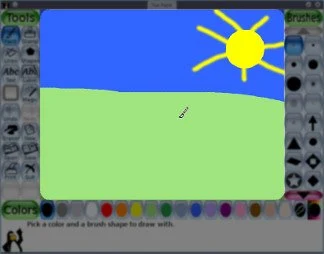
Tux Paint is a drawing app with a canvas, a row of colours and separate panels for selecting tools and brushes. It includes freehand painting, straight lines, filled and outlined shapes, text and rubber stamps. A cartoon penguin gives short prompts as you work.
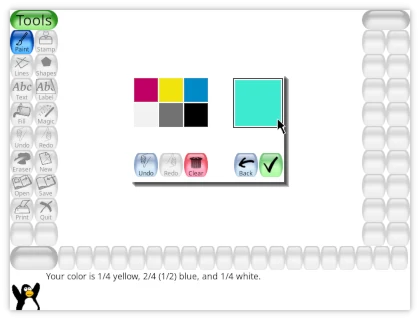
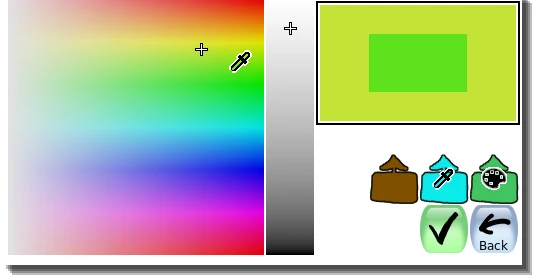
The colour mixer combines basic colours and shades, while the rainbow selector lets you choose from a wider range. Undo and redo help you revise a picture, and the Open screen provides access to saved drawings and an export option.
The publisher supports Android phones and tablets. Tool panels sit beside the canvas, so a larger display leaves more room for drawing. Available stamps and effects can vary between releases.
What you can do
- Freehand brushes, lines and shapes
- Text and rubber stamps
- Colour mixer and rainbow selector
- Undo and redo
- Saved drawings and picture export
Free features and limits
The included stamp collection and available effects can vary with the Android release.
Image credits
App icon
Tux Paint © 2002–2025 various contributors. GPL-2.0-or-later. Tux illustration by Sam “Criswell” Hart, based on Larry Ewing’s Tux; graphics created with The GIMP. Original publisher documentation images, unchanged. Earlier shared interface views, not Android device captures. Display copies may be resized or re-encoded.
Screenshot 1
Publisher documentation view of Tux Paint’s shared drawing workspace; earlier desktop interface.
Tux Paint © 2002–2025 various contributors. GPL-2.0-or-later. Tux illustration by Sam “Criswell” Hart, based on Larry Ewing’s Tux; graphics created with The GIMP. Original publisher documentation images, unchanged. Earlier shared interface views, not Android device captures. Display copies may be resized or re-encoded.
Screenshot 2
Publisher documentation view of the colour mixer, also implemented in the native Android app.
Tux Paint © 2002–2025 various contributors. GPL-2.0-or-later. Tux illustration by Sam “Criswell” Hart, based on Larry Ewing’s Tux; graphics created with The GIMP. Original publisher documentation images, unchanged. Earlier shared interface views, not Android device captures. Display copies may be resized or re-encoded.
Screenshot 3
Publisher documentation view of the rainbow colour selector, also implemented in the native Android app.
Tux Paint © 2002–2025 various contributors. GPL-2.0-or-later. Tux illustration by Sam “Criswell” Hart, based on Larry Ewing’s Tux; graphics created with The GIMP. Original publisher documentation images, unchanged. Earlier shared interface views, not Android device captures. Display copies may be resized or re-encoded.